

Last updated: March 20, 2026
Quick Answer: Journal it! is a private, encrypted life organizer that combines journaling, habit tracking, task management, notes, and planning in a single cross-platform app. It’s a strong pick for anyone who wants one secure place for their personal data instead of juggling five different tools. At $39 for lifetime access (License Tier 1), it’s priced well below what most subscription-based alternatives cost over two or three years.
Key Takeaways
- Journal it! replaces multiple apps by combining journaling, planning, notes, habits, and goal tracking in one place
- End-to-end encryption protects your text data; you own your data entirely
- Works fully offline on iOS, Android, macOS, and web
- Lifetime access starts at $39 (one license) — no recurring subscription fees
- Bi-directional linking lets you connect entries, notes, and tasks across the app
- Cross-content search makes finding anything fast, even in large journals
- This AppSumo deal is for new Journal it! users only — existing accounts don’t qualify
- Plus members get an additional 16% off sitewide until March 20, noon CT
What Is Journal it! and What Problem Does It Solve?
Journal it! is a private life organizer app designed to replace the scattered collection of tools most people use to manage their inner and outer lives. Instead of keeping a journal in one app, tasks in another, habits in a third, and random notes somewhere else entirely, Journal it! pulls all of that into one encrypted, offline-capable workspace.
The core problem it solves is fragmentation. Most productivity-minded people have a journaling app, a to-do list, a habit tracker, and some kind of note-taking tool running simultaneously. That setup creates friction — you’re constantly context-switching, and your personal reflections never connect to your goals or your tasks. Journal it! treats all of these as parts of the same life, because they are.
What Are the Key Features of Journal it!?
Journal it! covers five main functional areas: journaling, planning, notes, habit tracking, and goal management. Each one is genuinely built out, not just a checkbox feature.
Journaling and Timeline
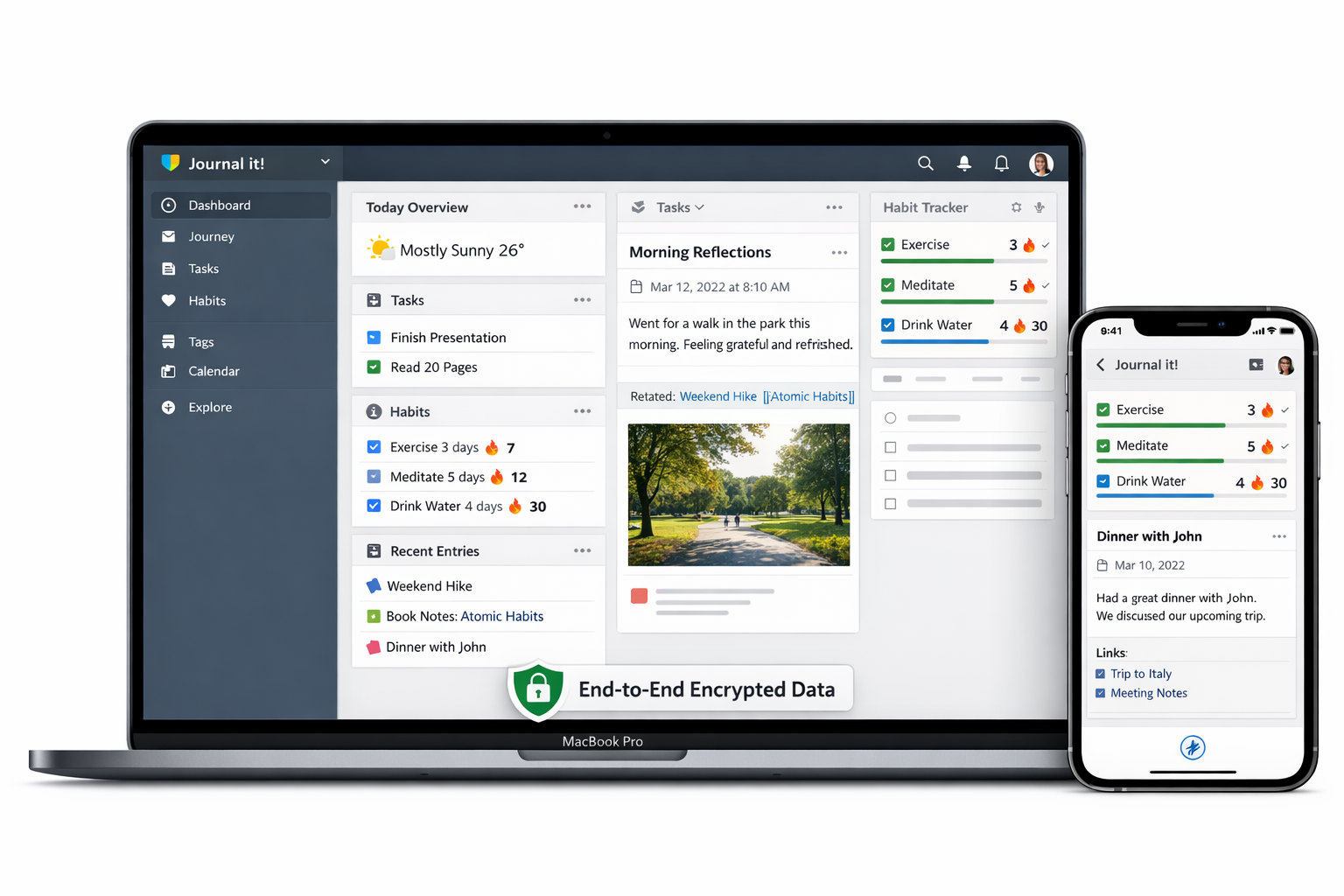
The journaling experience is the heart of the app. You get a full timeline view of your entries, which makes it easy to look back at any period of your life and see what you wrote, what you were working on, and what habits you were tracking at the same time. Entries support rich formatting, and the timeline creates a natural chronological record without you having to organize anything manually.
Task Management and Goals
Journal it! includes a real task management system, not just a basic checklist. You can set goals, break them into tasks, and track progress over time. This is where the app earns its “life organizer” label — it connects your intentions (goals) to your daily actions (tasks) to your reflections (journal entries) in a way that feels coherent.
Habit Tracking
The habit tracker lets you build streaks, log daily behaviors, and see patterns over time. It’s integrated with the rest of the app, so if you’re journaling about a rough week, you can also see that your sleep habit fell apart at the same time. That kind of connected view is hard to get when you’re using separate apps.
Bi-Directional Linking
This is one of the more powerful features for people who like connected note-taking. Bi-directional linking means that when you link one entry or note to another, the connection shows up on both sides. If you write a journal entry that references a goal, that goal’s page also shows the journal entry. It’s the kind of feature that makes your data more useful over time as your library grows.
Cross-Content Search
Search works across everything — journal entries, notes, tasks, habits. If you remember writing something six months ago but can’t find it, you can search a phrase and pull it up regardless of what type of content it is. For heavy users with hundreds of entries, this is essential.
End-to-End Encryption and Offline Access
Journal it! encrypts your text data end-to-end, meaning the company can’t read your entries even if they wanted to. You also get full offline access on iOS, Android, macOS, and web. This matters for anyone who journals sensitive personal content or simply doesn’t want their private thoughts sitting unprotected on a server somewhere.
How Does Journal it! Perform in Real-World Use?
For daily journaling, the experience is clean and low-friction. Opening the app and starting a new entry takes seconds, and the timeline view means you’re never hunting for where to put something. The offline functionality works as advertised — you can write entries on a plane or in a location without internet and everything syncs when you’re back online.
The habit tracker is practical without being overwhelming. You set up the habits you want to track, check them off daily, and the app builds your streak data automatically. It’s not trying to gamify everything with badges and animations — it just shows you your data clearly.
Where the bi-directional linking really shines is for people who use the app as a kind of personal knowledge base. If you’re working toward a major goal and you write about it regularly, those linked entries create a narrative thread you can follow back through time. That’s genuinely useful for self-reflection and for staying accountable.
The cross-platform sync between iOS, Android, macOS, and web is smooth. Starting an entry on your phone and finishing it on your laptop works without any manual steps.
Pros and Cons of Journal it!
What We Love
- Combines journaling, planning, notes, habits, and tracking without feeling bloated
- Full offline access on all major platforms — iOS, Android, macOS, and web
- End-to-end encryption for text data with complete data ownership
- Bi-directional linking creates genuinely useful connections between your content
- Cross-content search works across all entry types
- Lifetime access means no subscription creep — pay once and you’re done
- All future Pro plan updates are included
What Could Be Better
- The AppSumo deal is exclusively for brand-new Journal it! users — if you’ve had a previous account, trial, or paid plan with this partner, you’re not eligible
- Teams or families wanting shared journaling spaces will need the higher license tiers, which increases the upfront cost
Who Should Buy Journal it!?
Journal it! is a strong fit for people who are already using multiple apps to manage their personal life and want to consolidate. Specifically:
- Journalers who also want task management — if you write daily but also track goals and habits, this app connects those activities in a way that standalone journaling apps don’t
- Privacy-conscious users — end-to-end encryption and full offline access make this one of the more private options available
- People who dislike subscription fees — the lifetime deal eliminates recurring costs entirely
- Anyone building a personal knowledge base — bi-directional linking and cross-content search make Journal it! useful as a long-term personal archive
- Multi-device users — the cross-platform support covers iOS, Android, macOS, and web without extra cost
The License Tier 2 ($99 for 4 licenses) is a good option for small families or a couple who each want their own private account under one purchase.
Who Should Skip Journal it!?
Journal it! isn’t the right tool for everyone.
- Existing Journal it! users — this AppSumo deal is strictly for new users. Previous accounts, trials, or paid plans make you ineligible.
- People who only need a simple to-do list — if task management is your only need, a dedicated task app will serve you better than an all-in-one organizer
- Teams needing collaborative features — Journal it! is built around personal, private use. It’s not a team collaboration tool
- Users who need image-heavy journals — the encryption and feature set focus on text data; if your journaling style is heavily visual, check the current feature set before purchasing
How to Get the Best Deal on Journal it!
The current AppSumo pricing offers significant savings over the standard retail price. Here’s how to make the most of it:
- Decide how many licenses you need upfront. You can upgrade between tiers while the deal is live, but it’s cleaner to start at the right tier. If you’re buying for yourself only, Tier 1 ($39) covers you. For a family of four, Tier 2 ($99) makes more sense than buying four separate Tier 1 licenses.
- Check your AppSumo Plus membership status. Plus members get 16% off sitewide until March 20, noon CT — that discount applies here and brings Tier 1 down further.
- Confirm you’re a new user before purchasing. Previous accounts, trials, or paid plans with Journal it! through this partner disqualify you from the deal. If you’ve tested the app before, verify your eligibility before completing the purchase.
- Stack the deal during the Plus member window if you’re considering upgrading your AppSumo membership — the combined savings are meaningful at the higher tiers.
Frequently Asked Questions About Journal it!
Is Journal it! really private? What does end-to-end encryption mean here?
Yes, Journal it! uses end-to-end encryption for your text data, meaning your entries are encrypted on your device before they’re transmitted or stored. The company cannot read your journal content. You retain complete ownership of your data.
Does Journal it! work without an internet connection?
Yes. Journal it! offers full offline access on iOS, Android, macOS, and web. You can create entries, manage tasks, and track habits without a connection. Data syncs when you’re back online.
What’s included in all license tiers?
Every tier — from Tier 1 at $39 to Tier 4 at $299 — includes unlimited items and entries, the full journaling and timeline feature, task management and goals, and lifetime access with all future Pro plan updates. The difference between tiers is the number of licenses (1, 4, 10, or 20).
Can I upgrade my license tier after purchasing?
AppSumo deals typically allow tier upgrades while the deal is active. Check the product page for current upgrade policies, as terms can change during the deal window.
What platforms does Journal it! support?
Journal it! runs on iOS, Android, macOS, and web. All platforms are included in every license tier.
I’ve used Journal it! before. Can I still get this deal?
No. This AppSumo deal is exclusively for brand-new Journal it! users. Previous accounts, free trials, and prior paid plans through this partner are not eligible.
Is this a one-time payment or a subscription?
It’s a one-time lifetime payment. You pay once and get lifetime access, including all future Pro plan updates, with no recurring fees.
Final Verdict: Is Journal it! Worth Buying?
Journal it! delivers on its core promise: one private, encrypted place for your journal, tasks, habits, notes, and goals. The bi-directional linking and cross-content search set it apart from simpler journaling apps, and the offline-first approach with end-to-end encryption makes it genuinely trustworthy for personal content.
At $39 for lifetime access, the math is straightforward. Most subscription journaling or productivity apps cost $5 to $15 per month. Journal it! pays for itself within a year at the entry tier, and you keep it forever with all Pro updates included.
The only real friction points are the new-user restriction (existing Journal it! users can’t use this deal) and the fact that it’s built for personal use, not team collaboration. If neither of those applies to you, this is a well-priced, well-built tool worth picking up.